Manually register a short position
FolioCenter can register a short two ways: a plain short sale of a security you don’t hold, or a CFD opened in the Short direction. This page covers both and when to pick each.
How shorting works in FolioCenter
There is no single “go short” button. The app supports shorting through two supported routes, and which one you use depends on how you actually hold the position:
- Plain equity short sale — use a normal Sell transaction on a security you don’t own (or sell more than you hold). The position engine is fully two-sided: any quantity sold beyond your long shares opens a
SHORTlot automatically. Nothing blocks selling more than held. - CFD short (leveraged derivative) — use CFD Trade → Open new trade and set Direction = Short (Sell / Down). This is the route for margin, leverage, swap/financing and dividend-equivalent handling.
Which to pick: use the Sell-to-open route for a genuine borrowed-stock short in a cash/margin securities account (it flows through the same cost-basis and P&L engine as your equities). Use the CFD route when your broker position is actually a contract-for-difference with margin and leverage — it keeps the notional out of your cash balance and only books commission on open.
Open the short
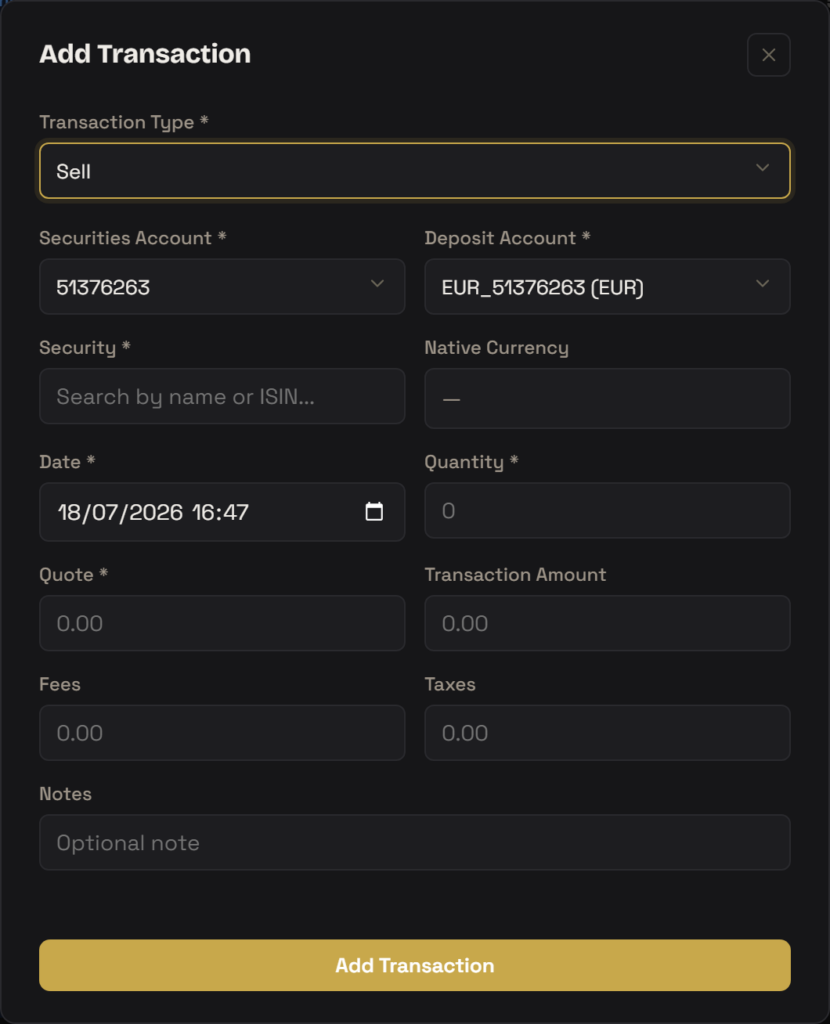
Route A — equity short sale. Click Add Transaction, set Transaction Type = Sell, then complete the Buy/Sell form:
- Pick the Securities Account and Deposit Account.
- Search and select the Security — you do not need any existing holding.
- Set Date, Quantity (the number of shares you are shorting) and Quote (the sale price per share).
- Add Fees / Taxes if any, then click Add Transaction. Because there are no long shares to close, the sale opens a short position — your net share count goes negative.
The Sell form only validates that Quantity > 0 and Quote > 0. There is deliberately no guard stopping you selling more than you own — that is exactly how a short is opened.
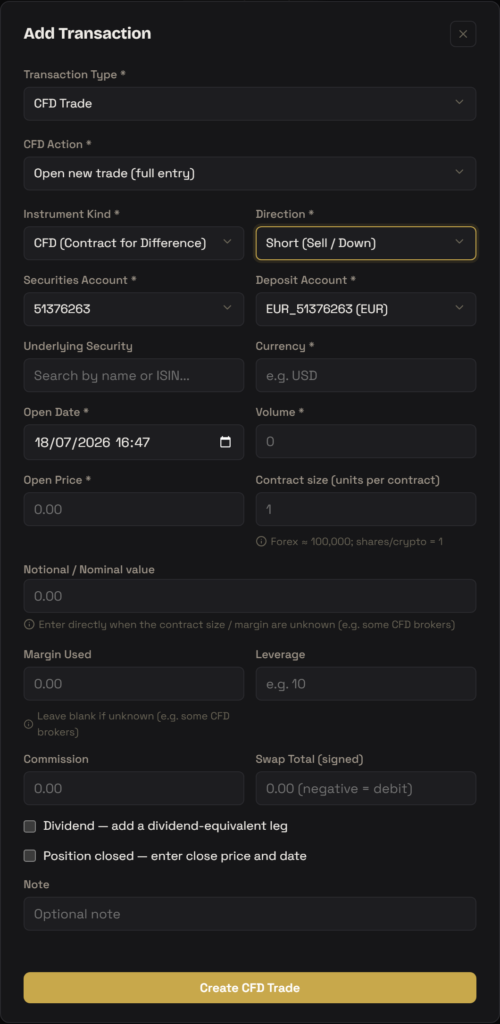
Route B — CFD short. Click Add Transaction, set Transaction Type = CFD Trade, choose Open new trade, then:
- Leave Instrument Kind = CFD and set Direction = Short (Sell / Down).
- Pick the Securities Account and Deposit Account; select the Underlying Security (its Currency auto-fills).
- Enter Open Date, Volume and Open Price. Set Contract size if it isn’t 1 (forex ≈ 100,000; shares/crypto = 1).
- Optionally add Margin Used + Leverage, or type the Notional / Nominal value directly — a live notional preview and a coherence warning help you reconcile them.
- Optionally record Commission, a signed Swap Total (negative = financing debit) and a Dividend leg (enter it as negative — a short pays the dividend away). Click Create CFD Trade.
Covering / closing the short
Equity short: to cover, enter a Buy of the same security. A Buy first covers open short lots FIFO: buying exactly the shorted quantity brings you back to flat (like a fully sold long); buying more covers the short and then opens a new long lot. Partial buys leave a smaller short with proportional proceeds.
CFD short: edit the trade and tick Position closed — enter close price and date, then supply Close Price and Close Date (you can also fill these at creation time if the trade is already closed). The form shows an estimated P&L, but the backend recomputes the authoritative realized figure.
How FolioCenter models a short
Equity short (position engine). The FIFO cost-basis engine is two-sided. A short lot stores your net shares as a negative magnitude, and its cost basis is −proceeds (the cash you received is held as a liability). Market value is shares × price, which is also negative. Unrealized gain is marketValue − costBasis — so when the price falls below your entry, that difference is a profit; when it rises, a loss. Long-only portfolios are completely unaffected: a plain buy-then-sell never creates a short lot.
- CFD short (derivative sleeve). Stored as a trade group, not through the equity engine. Opening books only a commission to cash — the notional and margin stay in your account balance.
- Realized P&L on close is
(closePrice − openPrice) × volume × contractSize, sign-flipped for a short, so it gains when the price drops. - Valuation of an open short uses a market feed where available (
MARKET), otherwise the broker mark (BROKER_MARK) or the open price (OPEN_CARRY). - A dividend over the holding period is a debit for a short (you pay it away); enter the dividend leg as a negative amount.
Troubleshooting
Yes. Add a Sell transaction for a security you hold none of (or sell more than you hold). The position engine opens a short lot automatically — there is no rule blocking you from selling more than you own.
You don’t. Buy/Sell has no direction toggle; direction is inferred from your net position. Selling into a zero (or smaller) holding is the short. An explicit Direction = Short field exists only on the CFD (and Future / Option) forms.
No, that’s correct. For a short lot the cost basis is stored as negative proceeds, so gain = proceeds − current liability. The value moves against the price: down = profit, up = loss.
Correct — opening a CFD only books the commission to cash. The margin and notional are not deducted from your balance; realized P&L settles to cash only when you close.
FolioCenter is a portfolio record-keeping tool. Registering a short here tracks a position you already hold with your broker — it does not place, borrow, or execute any trade, and nothing here is investment advice.