Track savings accounts and deposits
Your savings are part of your wealth. Track every savings account and term deposit next to your investments — with the interest worked out for you and booked on the day it’s paid.
Why track savings in FolioCenter
- Know what your cash really earns — the true rate after promotions, balance tiers and tax — not just the headline.
- See it in your net worth — savings sit beside your investments, so your whole picture is in one place.
- Free on every plan — no import, no bank connection — add an account in a minute.
Two kinds of savings
The Savings page has two tabs, because the two products behave differently.
- Savings accounts are open-ended. You add and withdraw money whenever you like, and interest is earned on whatever the balance was, day by day.
- Savings deposits lock a fixed principal for a term. They have a maturity date, may renew automatically, and usually charge a penalty if you take the money out early.
Savings are available on every FolioCenter plan, and need no import: you type in what your bank tells you.
Four terms worth knowing
Nominal rate (TAN) vs yield (APY / TAE). The rate a bank quotes is usually the nominal annual rate. If interest is paid monthly and left in the account, it earns interest itself, so the effective annual yield is a little higher. FolioCenter shows both: 2.5000% TAN with 2.53% APY underneath.
Day count. Banks disagree about how long a year is. ACT/365 counts the real calendar and is common for GBP and USD. ACT/360 divides actual days by 360, so it pays slightly more than the quoted rate suggests; most euro-area banks use it. 30E/360 treats every month as 30 days. Pick the one in your contract and the interest will match your statement far more closely.
Payment and compounding. Payment frequency is how often interest is credited (monthly to annually, or at maturity for a deposit). Compounding can be finer than payment: paid quarterly, compounded monthly.
Withholding tax. Enter your rate and every payment is booked with its gross amount, the tax withheld and the net that actually arrives.
Add a savings account
- Open Savings → Accounts and choose New Savings Account.
- Give it a name and, optionally, the bank.
- Choose the carrier. By default FolioCenter creates a dedicated account for it and books the opening money as a transfer from one of your existing accounts. If your broker already pays interest on idle cash, attach that existing account instead.
- Set the payment frequency, day count and withholding rate, and choose whether interest is capitalised into the account or paid to another one.
- Fill in the rate schedule, then save.
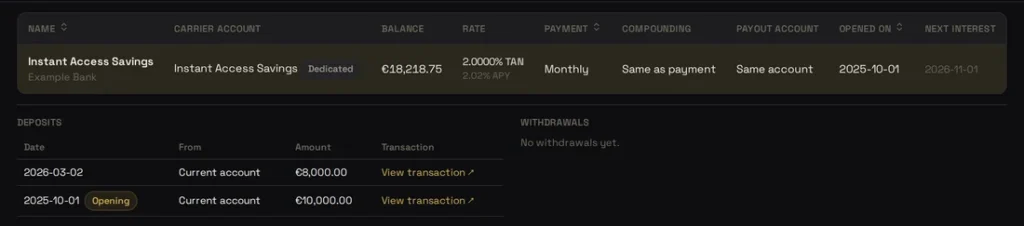
Moving money in or out is a transfer between your own accounts. That matters for performance: a transfer is not a gain or a loss, so topping up your savings never distorts your returns. The interest is what counts as income.
Rate schedules: promotions, step-ups and tiers
Real savings rates rarely stay flat. One schedule covers all the common shapes:
- Promotional then normal — 2.5% for six months, then 2%. Add a second rate period with a later start date.
- Step-ups — a rate that rises each year. One period per step.
- Balance tiers — 2% on the first €15,000 and 0.75% on the rest. Add a balance tier within the same date window.
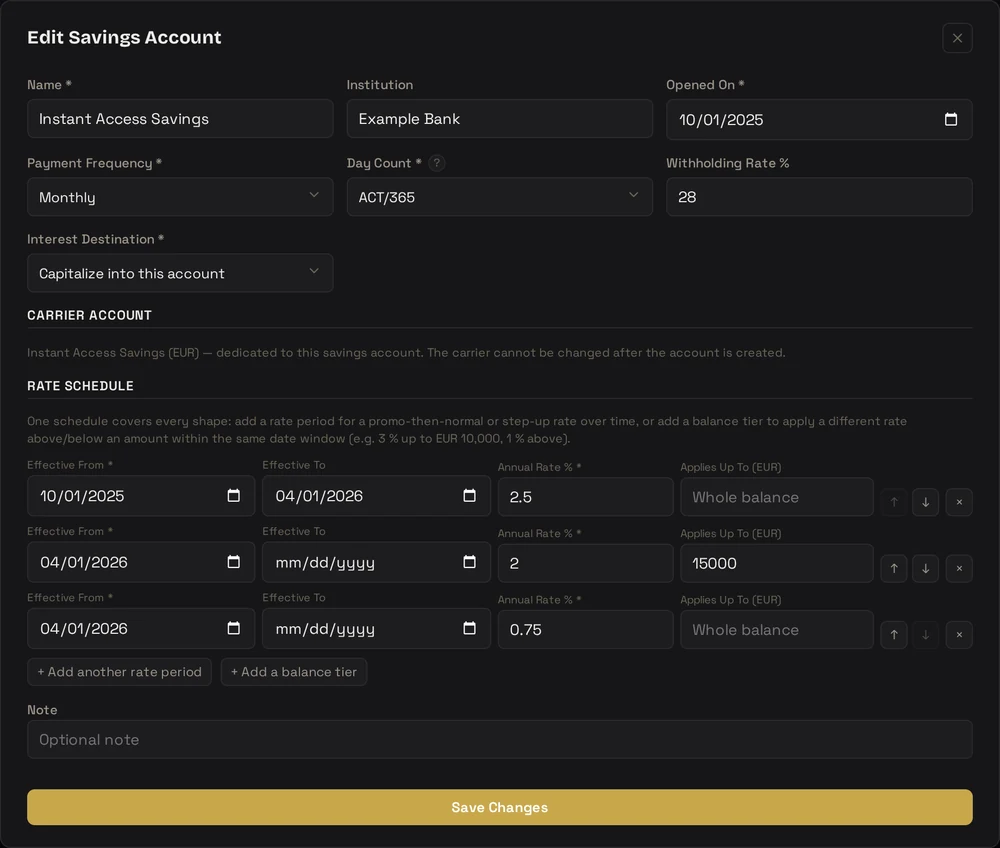
With tiers, the rate you actually earn depends on your balance. On €18,200 split across the two tiers above, the blended rate is about 1.79%, not 2%. FolioCenter calculates that blend for every period and shows it in the schedule, so a headline rate never flatters what the account really pays.
Interest, worked out for you
For each payment period FolioCenter takes the average daily balance of the account, applies the rate in force and the day count, and books the result on the due date. Money added in the middle of a month earns from the day it lands, which is how banks pay and why a simple start-of-period figure would underpay you.
Past periods are booked as real interest transactions. Future periods are projected: shown in the schedule with a dashed marker, but never counted in your value or returns until they are actually paid. Interest is booked automatically each night, and if you backdate an account its history is filled in straight away.
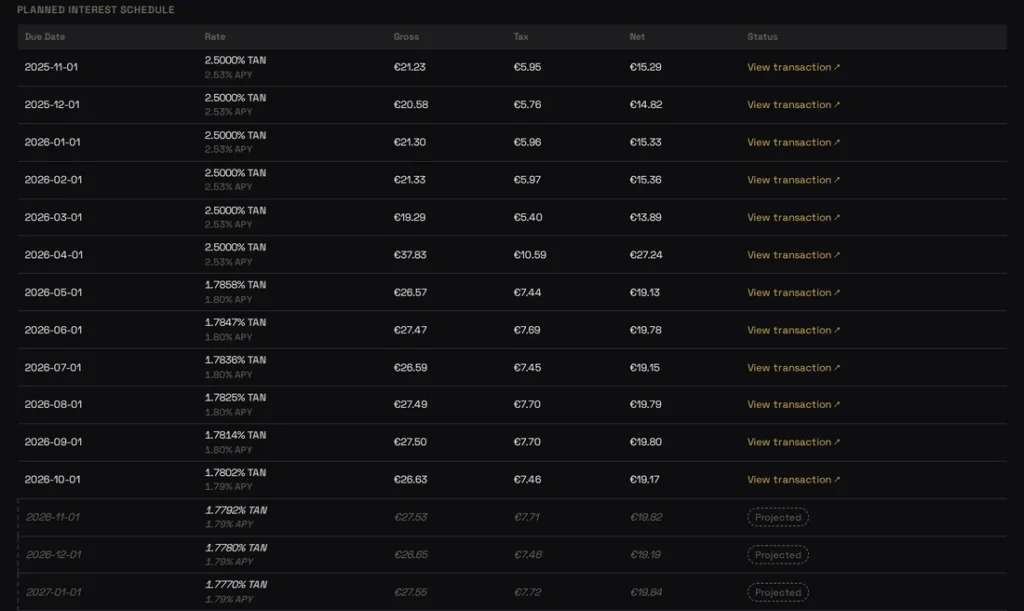
Changed a rate after the fact? If you edit the schedule or backdate a transfer, FolioCenter notices that interest already booked no longer matches and offers to recalculate it.
Fixed-term deposits
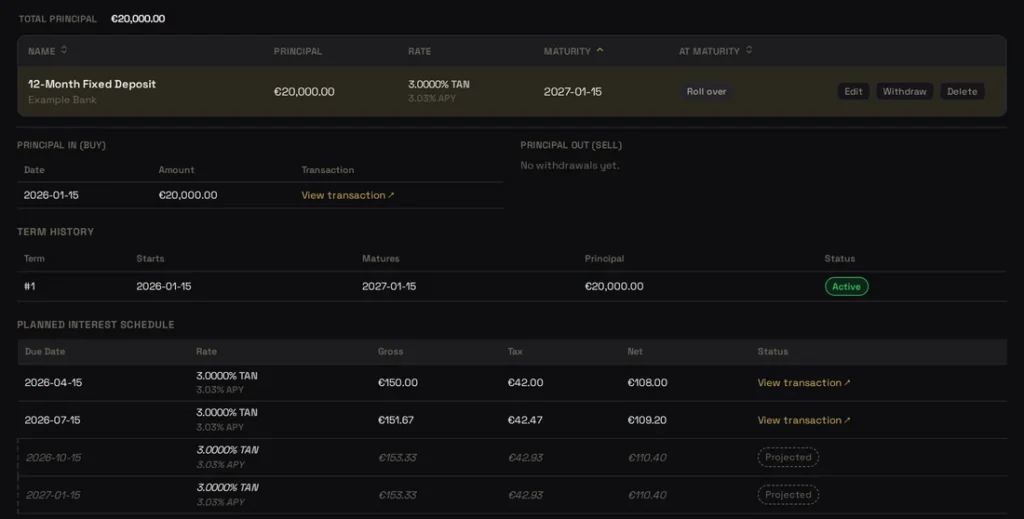
On the Deposits tab, a deposit records its principal, opening and maturity dates, rate schedule and payment frequency. The principal opens as a Savings holding in the portfolio you choose, so it sits on your statement of assets next to your securities, and its interest is always paid into the account you name.
Two decisions are part of the contract:
- At maturity — pay out, returning the principal to an account, or roll over into a new term. For a rollover, add a rate period that runs past maturity and it becomes the renewal rate. Without one, the new term waits for you to enter the rate the bank offers, and books nothing until you do.
- Early withdrawal — no penalty, lose the current period’s interest, receive a reduced rate for the period, or lose the period’s interest plus a flat fee. Whatever your bank applies, FolioCenter applies the same when you withdraw early.
Common questions
Check the day count first — ACT/360 against ACT/365 is the usual culprit — then the withholding rate. Banks also round each payment, and some post interest a day or two after the period ends.
Yes. When you create the savings account, attach the existing account instead of creating a new one. The interest is booked into it without touching your trades.
No. Add a rate period starting on the date the new rate applies. Periods before it keep the old rate; everything after uses the new one.
Close it from the account’s actions and choose where the remaining balance goes. Closed accounts are hidden by default and can be shown — and reopened — with Show closed accounts.
Yes. The principal is a holding and the interest is income, so both appear in your fund’s value and performance like any other asset.
Put your savings in the picture
Add your savings accounts and deposits for free, and see exactly what your cash earns.
Start free →Already have an account? Sign in
Savings accounts and deposits are available on every FolioCenter plan. This guide is about using the app and isn’t financial advice — check the terms of your own account.