Import from Interactive Brokers
Bring your Interactive Brokers account into FolioCenter with an Activity Flex Query — a one-time report that exports your trades, cash and corporate actions as XML.
Before you start
Interactive Brokers doesn’t hand you a ready-made file — instead you define a Flex Query: a report you set up once in IBKR’s portal that exports your activity as an XML statement. You generate it, download the file, and drop it into FolioCenter. The app reads the file; it never connects to IBKR or sees your login.
You only configure the Flex Query once. After that, each new statement is a quick re-run (and IBKR can even email it to you on a schedule).
Create an Activity Flex Query
- Log in to the IBKR Client Portal and open Performance & Reports → Flex Queries.
- Next to Activity Flex Query, create a new query and give it a name (e.g. “FolioCenter”).
- Add these sections and tick all fields in each (simplest and future-proof): Trades, Cash Transactions, Transfers, Corporate Actions, and Financial Instrument Information. If you trade options, also add Option Exercises, Assignments and Expirations.
- Set Format = XML and choose your date period.
- Save the query.
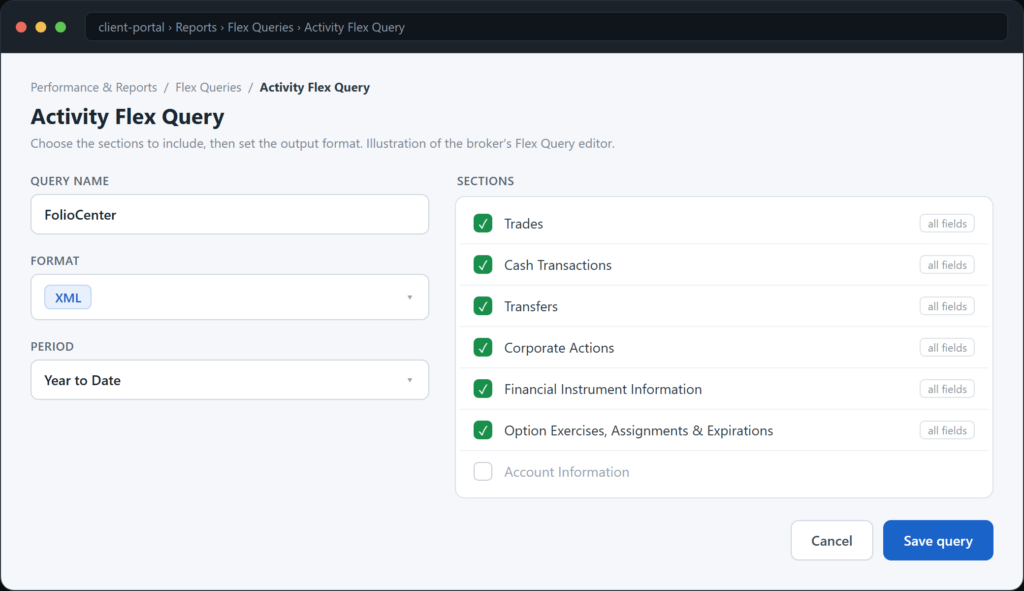
IBKR caps a single Flex statement at 365 days. For several years of history, run the query once per year and import each XML — FolioCenter de-duplicates by IB’s own transaction IDs, so overlapping ranges never double up.
Download your statement
- On the Flex Queries page, Run your Activity Flex Query.
- Pick the period and download the generated XML file.
FolioCenter takes the XML directly, or a .zip containing it — whichever IBKR gives you.
Import into FolioCenter
- Start a new import and choose the Interactive Brokers card.
- Drop your Flex XML (or zip) into the drop zone.
- Give the fund a name.
- Confirm the base currency. If the statement holds several currencies, pick the fund’s main one.
- Import. You’ll get a summary of the portfolios, accounts and transactions created.
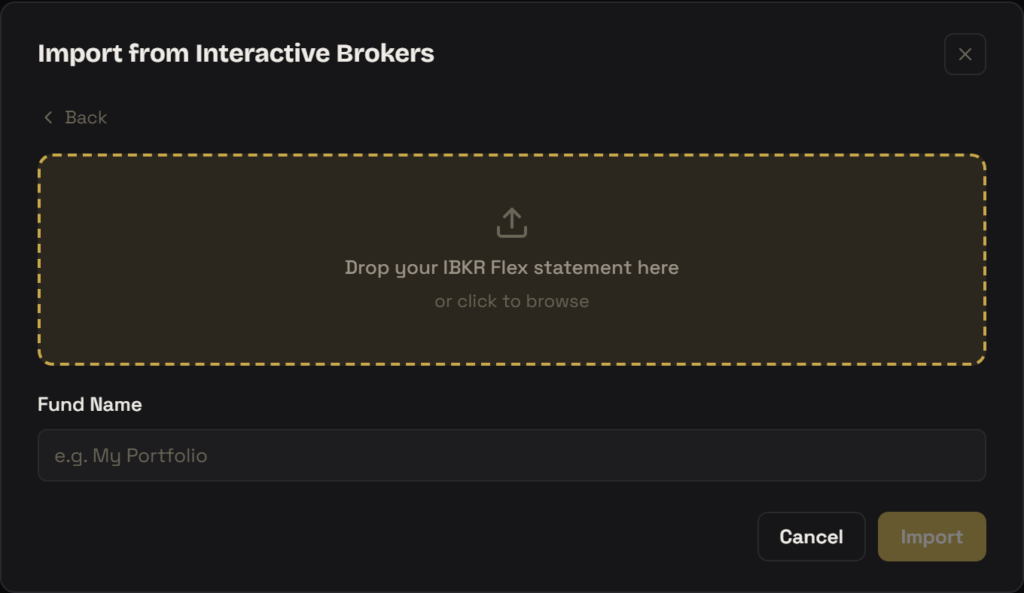
Each IB account in the file becomes its own portfolio, with a separate cash account per currency — mirroring how IB keeps a sub-balance per currency. Forex trades are recorded as paired transfers between those currency accounts.
What gets imported
- Trades — shares and ETFs, plus options, futures and CFDs, with commissions
- Dividends and withholding tax
- Interest and fees (including stock-borrow / hard-to-borrow fees)
- Deposits, withdrawals and transfers
- Forex (as paired cash transfers between currency accounts)
- Corporate actions — splits, mergers and similar
After importing
Holdings with no market-data feed are flagged on the import summary with an Add prices button — see Import a manual price history to value them yourself.
Troubleshooting
Check that the Flex Query format is XML (not CSV or PDF) and that it’s an Activity Flex Query, not a Trade Confirmation one. Re-run and import the XML (or the zip) again.
A Flex Query only exports the sections you enabled. Edit the query, add the missing section (e.g. Corporate Actions or Cash Transactions) with all fields, then re-run and re-import.
IBKR caps a Flex statement at 365 days. Run the query once per year and import each XML — duplicates are removed automatically.
Correct — rows are de-duplicated by IB’s own transaction IDs, so importing an overlapping or updated statement only adds what’s new.
Interactive Brokers is an independent third party; you export your own data and should check its terms of use. FolioCenter only reads the file you upload — it never connects to your broker. This guide is about using the app and isn’t investment advice.