Manually register a future
A future is a derivative trade group in FolioCenter: you book the opening leg now and the closing leg when the position is unwound. This page walks the manual entry, field by field.
When to use this
Reach for manual entry when a futures trade isn’t coming in through a broker import (Interactive Brokers Flex, XTB) — a historical position, a broker FolioCenter doesn’t parse yet, or a one-off correction. If your broker is supported, import instead: it reconstructs the whole trade group automatically.
FolioCenter models a future as a derivative trade group, not a stock-style buy/sell. It is treated internally as a CFD without financing or dividends, plus an expiry date. The group has an open leg (booked now) and a later close leg that settles realized P&L. You can enter both at once if the position is already closed, or just the open leg and close it later.
- Open leg — records direction, contracts, entry price and commission; the commission is the only cash that moves.
- Close leg — records the exit price and date; realized P&L books as cash on the close date.
- No leverage or margin input — futures carry no broker-reported per-position margin here, so notional (contract size × price × contracts) drives the return.
Open the future position
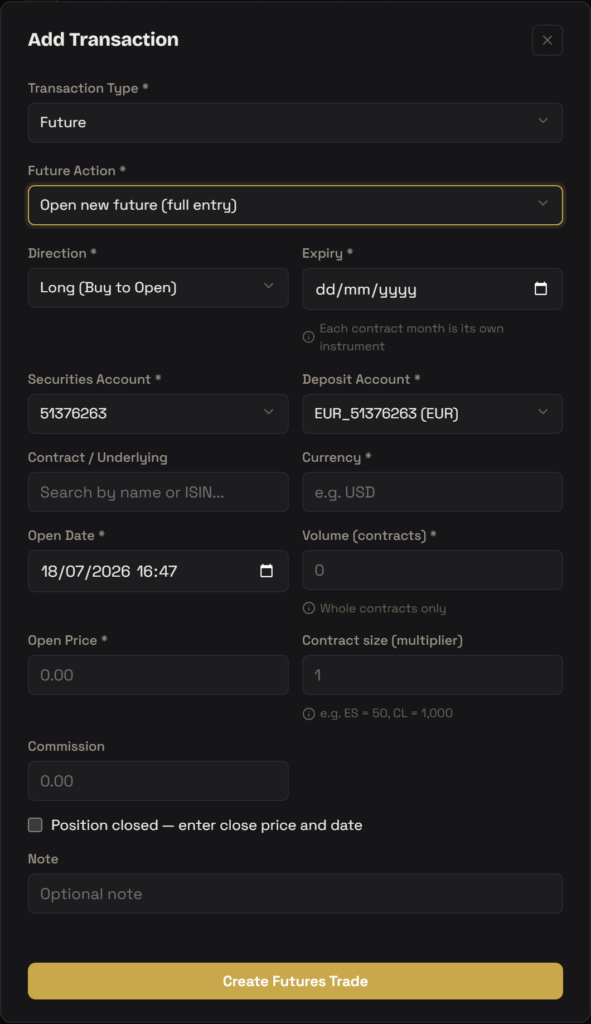
From the Transactions area, open Add Transaction. Set Transaction Type to Future, then in the Future Action sub-dropdown choose Open new future (full entry). This reveals the futures trade form.
- Direction * — pick
Long (Buy to Open)orShort (Sell to Open). This sets the sign of your P&L on close: a long gains when price rises, a short when it falls. - Expiry * — the contract’s expiry date. Each contract month is its own instrument, so pick the exact expiry you traded (e.g. the Dec 2026 contract).
- Securities Account * — the portfolio that holds the position.
- Deposit Account * — the cash account that pays commission and settles the close-leg P&L. If the portfolio has a reference account it is pre-filled.
- Contract / Underlying — search by name or ISIN to link the future’s instrument. Optional; if the instrument doesn’t exist yet, create it first via Add Security (there is no dedicated Future type — use the free-text Type field, e.g.
Future). - Currency * — three-letter code the contract is denominated in (e.g.
USD). Auto-filled from the security if you linked one. - Open Date * — date and time the position was opened.
- Volume (contracts) * — number of contracts, whole numbers only. Fractions are rejected.
- Open Price * — the price per unit at which you opened (the quoted futures price, not the notional).
- Contract size (multiplier) — units per contract that scales price into money. Defaults to
1if blank; e.g. S&P 500 E-mini (ES) =50, WTI Crude (CL) =1,000. This is what makes notional realistic, so set it correctly. - Commission — broker commission on the open. This is the one cash cost booked now (it reduces the deposit account balance).
- Optionally tick Position closed — enter close price and date if the trade is already over, then fill Close Price * and Close Date *. Otherwise leave it unticked and close it later.
- Add an optional Note, then click Create Futures Trade.
As you type, a live Notional ≈ preview (open price × contracts × contract size) appears, and if you mark the position closed an Estimated P&L line shows — both are indicative; the backend recomputes the authoritative figures on save.
Closing it later
When the position is unwound, open Add Transaction again, set Transaction Type to Future, and choose Close a future in the Future Action dropdown. Pick the open position and enter the close price and close date. FolioCenter appends the close leg to the existing trade group and books the realized P&L — computed as (close price − open price) × contracts × contract size, signed by direction — as a cash movement on the deposit account, dated at the close.
Entering the close on the open form (via the Position closed toggle) and using Close a future later produce the same result — one open leg plus one close leg in the group.
How FolioCenter models a future
- Margin stays in your balance. No margin or leverage is posted — the stored margin is 0. Every screen therefore renders return-on-margin as
—, and return-on-notional (contract size × price × volume) carries the return. - Commission is the open cash cost. The open leg moves only the commission out of the deposit account; the notional is never withdrawn as cash.
- Realized P&L books on close. The close leg settles the signed profit or loss into cash on the close date — positive means cash in, negative means cash out.
- Valuation basis. With a market-data feed the position marks to the live price. Without one it uses
OPEN_CARRY: valued at the open price so intraday unrealized P&L is 0, and the entire realized P&L lands on the close date — a documented approximation for historical entries. - No financing or dividends. Unlike a CFD, a future has no swap/financing legs and pays no dividend equivalent.
Troubleshooting
Futures trade in whole contracts, so the Volume field rejects fractions rather than silently rounding. Enter an integer number of contracts; put the per-contract scaling in Contract size (multiplier) instead.
That is expected. Futures carry no broker-reported per-position margin, so FolioCenter stores margin as 0 and shows return-on-margin as a dash. Look at return-on-notional instead — make sure Contract size (multiplier) is set correctly, since it drives the notional.
Currency didn’t get populated. Either link a Contract / Underlying (which fills currency from the security) or type the three-letter code (e.g. USD) into the Currency field directly before saving.
The Contract size (multiplier) is probably left at its default of 1. Set it to the contract’s real size — e.g. 50 for S&P E-mini (ES), 1,000 for WTI Crude (CL) — so notional and realized P&L scale correctly.
Create it first: use Add Security, search or choose Empty Instrument, and set the free-text Type field to Future (there is no dedicated Future security type). Then it will appear in the Contract / Underlying search.
FolioCenter is a portfolio-tracking tool, not a broker or an advisor. Manually registering a future records a position you already traded elsewhere; it does not execute, modify, or settle any real trade, and nothing here is investment advice. Always reconcile against your broker statement.