Organize holdings with taxonomies
A taxonomy is a lens you define to group the holdings in a fund — by asset class, region, sector, or any scheme you like. FolioCenter values each group live from your positions, so you can see how your money is actually distributed.
What a taxonomy is
A taxonomy is a lens you define to group the holdings in a fund — by asset class, region, sector, currency, strategy, or any scheme that suits how you think about the portfolio. Each taxonomy is one named tree of categories, for example an Asset Classes taxonomy with Equities, Fixed Income, Cash and so on.
Every holding — a security position or a deposit-account cash balance — is placed into a category. FolioCenter then adds up the live market value of everything in a category, so each category shows its current share of the portfolio and its value. You can keep several taxonomies side by side, one per dimension, and switch between them.
Descriptive only. Classifying a holding never changes a transaction, a price, or a balance. A taxonomy is a view over what you already own — nothing more.
Where to find it
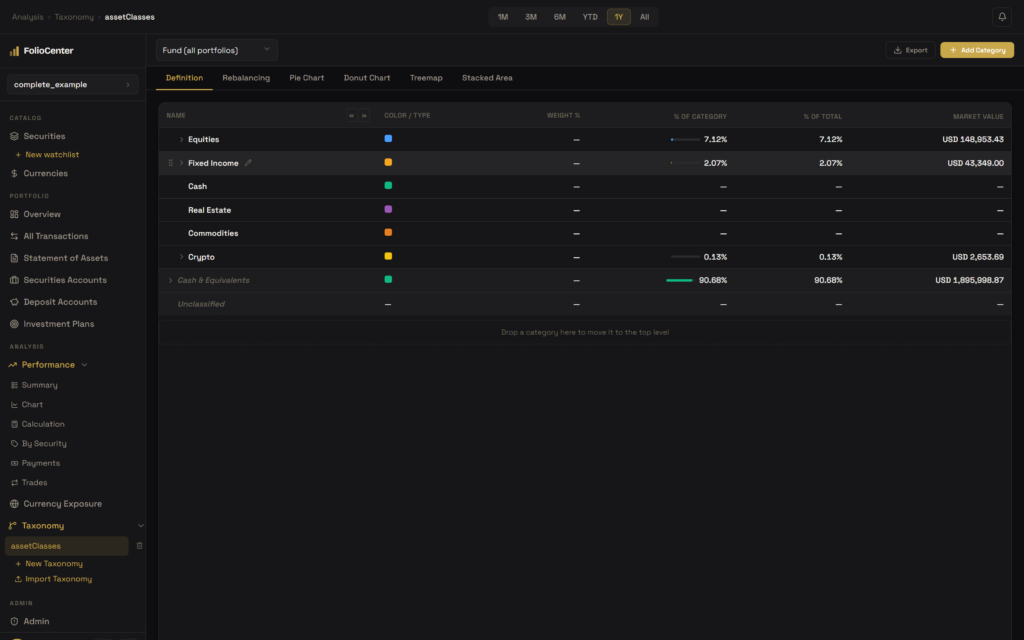
Open Analysis → Taxonomy in the left sidebar. Each taxonomy you create appears as an entry; selecting one opens its tabs: Definition (the category tree), Rebalancing, and four chart views — Pie, Donut, Treemap and Stacked Area.
Create a taxonomy
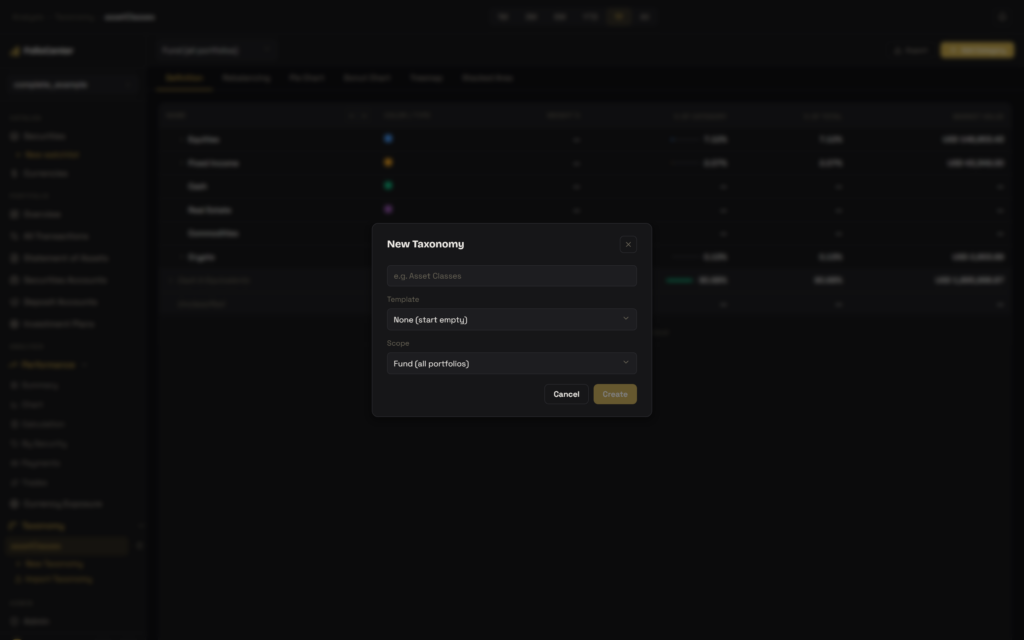
Choose New Taxonomy under the Taxonomy section of the sidebar and set three things:
- Name — what the scheme represents, e.g. Asset Classes or Regions.
- Template (optional) — start from a ready-made category tree published by an administrator, or leave it as None (start empty). A template is copied in at creation, not linked, so you can edit it freely afterwards.
- Scope — Fund (all portfolios) values every position in the fund, or pick a single portfolio to classify just that portfolio’s holdings and its cash. You can change the scope later from the toolbar.
Build the category tree
On the Definition tab, use Add Category to create a top-level category, giving it a name and a colour (the colour is reused across every chart). To organise the tree:
- Nest a category by dragging its grip onto another — for example Bonds and T-Bills under Fixed Income.
- Promote a nested category back to the top level by dragging it onto the drop zone at the bottom of the table.
- Reorder siblings by dropping a category just above or below another row.
Assign holdings to categories
Expand a category and drag a holding — a security or a cash account — into it. The table columns then read:
- Weight % — how much of that holding sits in this category. A holding can be split across categories: a mixed fund might be 60% in Equities and 40% in Fixed Income. The weights for a single holding total 100%.
- % of Category — the row’s share of its parent category.
- % of Total — the row’s share of the whole fund.
- Market Value — live, in the fund’s base currency.
Anything you haven’t placed yet appears in the derived Unclassified bucket, and deposit-account cash sits in Cash & Equivalents by default. Both are computed automatically: drag a holding out to classify it, and drop it back onto its home bucket to un-assign it.
Splitting is optional. Weights let one security belong to several categories at once, which is useful for multi-asset funds. If you never split anything, every holding is simply 100% in one category.
Visualize the allocation
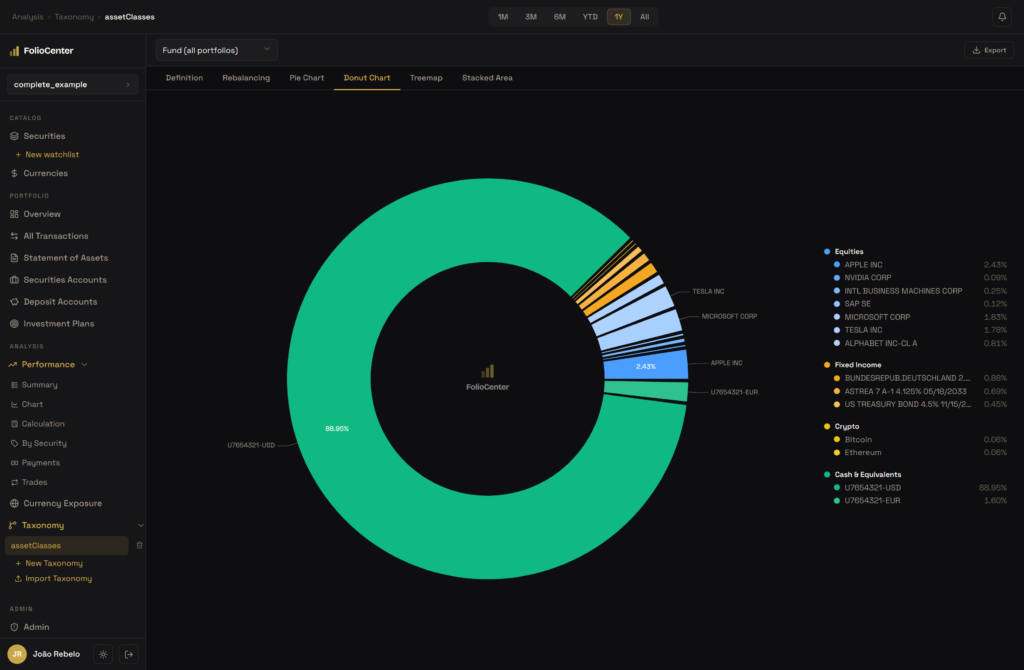
The Pie, Donut, Treemap and Stacked Area tabs all render the same tree. Pie and Donut show the current split by category and holding; Treemap sizes each block by value; Stacked Area shows how the allocation has shifted over time. Category colours carry across every view.
Scope: whole fund or one portfolio
A fund-scoped taxonomy values every position across all portfolios in the fund. A portfolio-scoped one counts only that portfolio’s holdings and its reference cash account — handy when a single fund holds several strategies. Switch between them anytime from the scope selector in the toolbar.
Reuse: templates, import and export
Taxonomies travel between funds, users and servers as a portable file:
- Export writes the active taxonomy to a file that carries its categories, weights and securities by ISIN or ticker — never internal ids.
- Import Taxonomy (in the sidebar) reads such a file into the current fund as a new taxonomy, matching each security against your existing holdings and reporting anything it couldn’t match. Import never creates securities.
- Templates seed a fresh category tree at creation time, so a standard scheme can be published once and reused by everyone.
Common questions
No. A taxonomy is purely a view over holdings you already own. Nothing about your positions, prices, or cash is altered when you classify them.
Yes — split it with Weight %. The weights for a single holding total 100%, for example 70% Equities and 30% Fixed Income.
Two automatic buckets. Unclassified holds any security you haven’t placed yet; Cash & Equivalents holds deposit-account balances by default. Drag holdings out to classify them, or drop them back to un-assign.
Yes. Create as many as you like — one per dimension, such as asset class, region or sector — and switch between them from the sidebar or the toolbar selector.
No. The Definition and chart tabs work with classification alone. Targets are only used by the Rebalancing tab — see Plan a rebalancing.
Next: once your holdings are organised, the Rebalancing tab compares them against target weights you set and computes the trades that would close the gap.